7 best practices for process chains in SAP BW/4HANA
How to design process chains in SAP BW/4HANA that are easy to maintain and monitor: naming conventions, meta chains, parallelism and housekeeping.
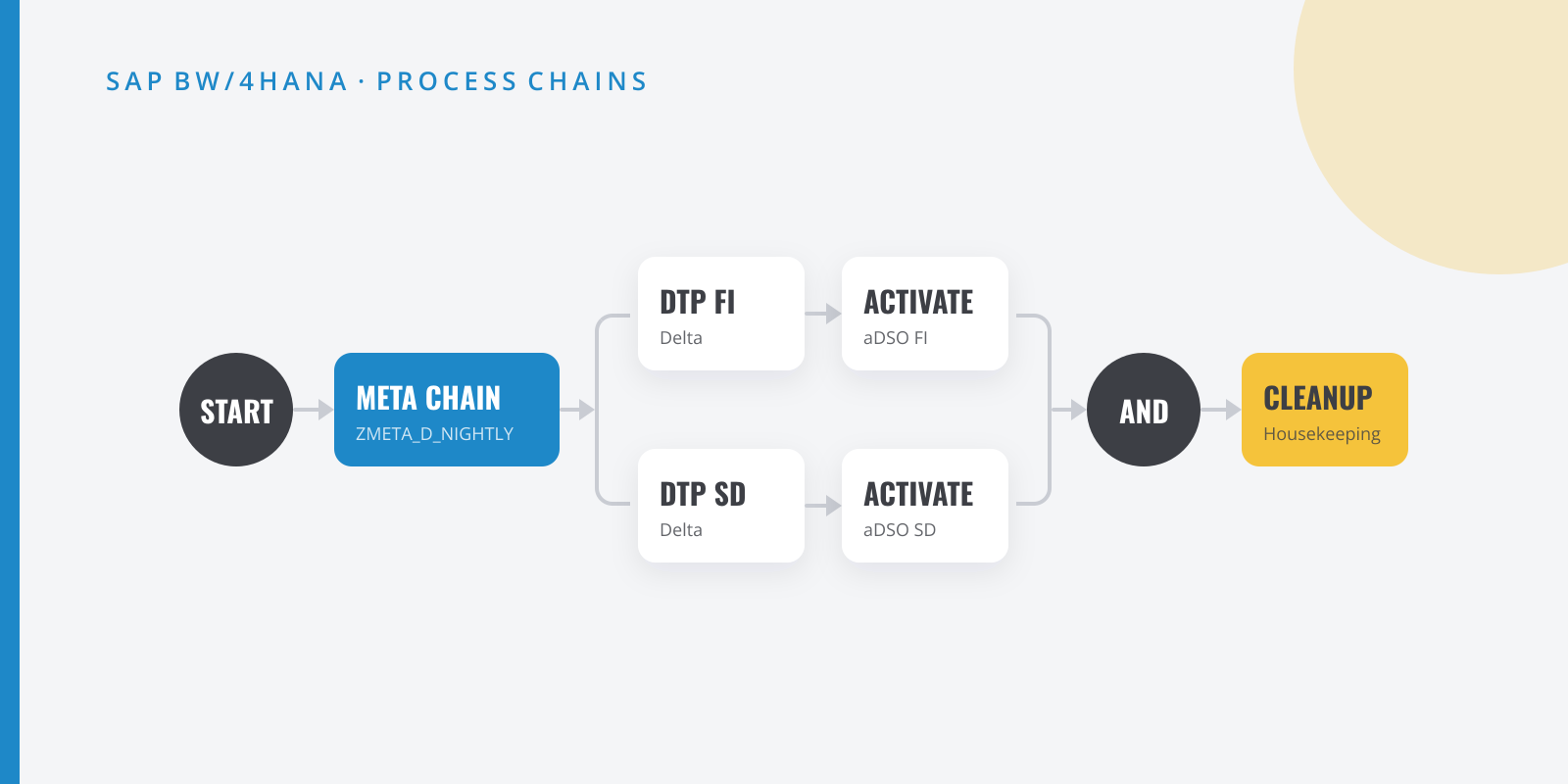
Table of contents
Process chains are the nervous system of a BW system. When they are well designed nobody thinks about them; when they are not, they cause half of the 7 a.m. phone calls. These are the practices I apply on every project.
1. A naming convention that explains itself
Define a pattern and never break it. For example:
Z<AREA>_<FREQUENCY>_<DESCRIPTION>ZFI_D_GL_DELTA → Finance, daily, general ledger deltaZSD_M_BILLING_FULL → Sales, monthly, billing full loadZMETA_D_NIGHTLY → Daily nightly meta chainThat way, from RSPC or the monitor you know what a chain does without opening it.
2. Meta chains by domain and frequency
Do not build one giant chain with 200 processes. Create local chains per functional area and orchestrate them from meta chains by frequency. The benefits:
- You can restart only the part that failed.
- Errors stay contained within one domain.
- Each local chain can be tested and transported independently.
3. Parallelize, but wisely
Running independent DTPs in parallel shortens the load window a lot, but every branch consumes background work processes (BGD). Check how many you have and leave headroom for other teams’ jobs.
4. Decide, don’t hardcode
Use the Decision Between Multiple Alternatives process type for logic such as “if it is month end, also run the full load”. It is far more transparent than an ABAP program that silently decides what to do.
5. Housekeeping inside the chain itself
Administrative data grows without anyone looking at it. Include in a weekly chain:
- Cleanup of old requests in the inbound tables and change logs of the aDSOs you no longer need for deltas.
- Deletion of old DTP and process chain logs.
- Deletion of application log data and temporary tables.
6. Proactive monitoring
Do not wait for a business user to tell you the report is not up to date:
- Set up email notifications on errors in critical processes.
- Use the process chain monitor (
RSPCM) with the chains relevant to your team. - Record run times: a chain that takes 30% longer than last week is a warning sign.
7. Document the chain inside the chain
Every process accepts a long description. Use it to explain why that step exists, what to do if it fails and who the business owner is. Whoever maintains it two years from now (maybe you) will thank you.
Is there a practice missing from the list? I am sure you have a war story or two with process chains; tell me about it on LinkedIn.