aDSO types in SAP BW/4HANA: which one to choose and why
Standard, Staging, Data Mart or Direct Update: which tables each aDSO type creates in SAP BW/4HANA, how activation behaves and when to use each one.
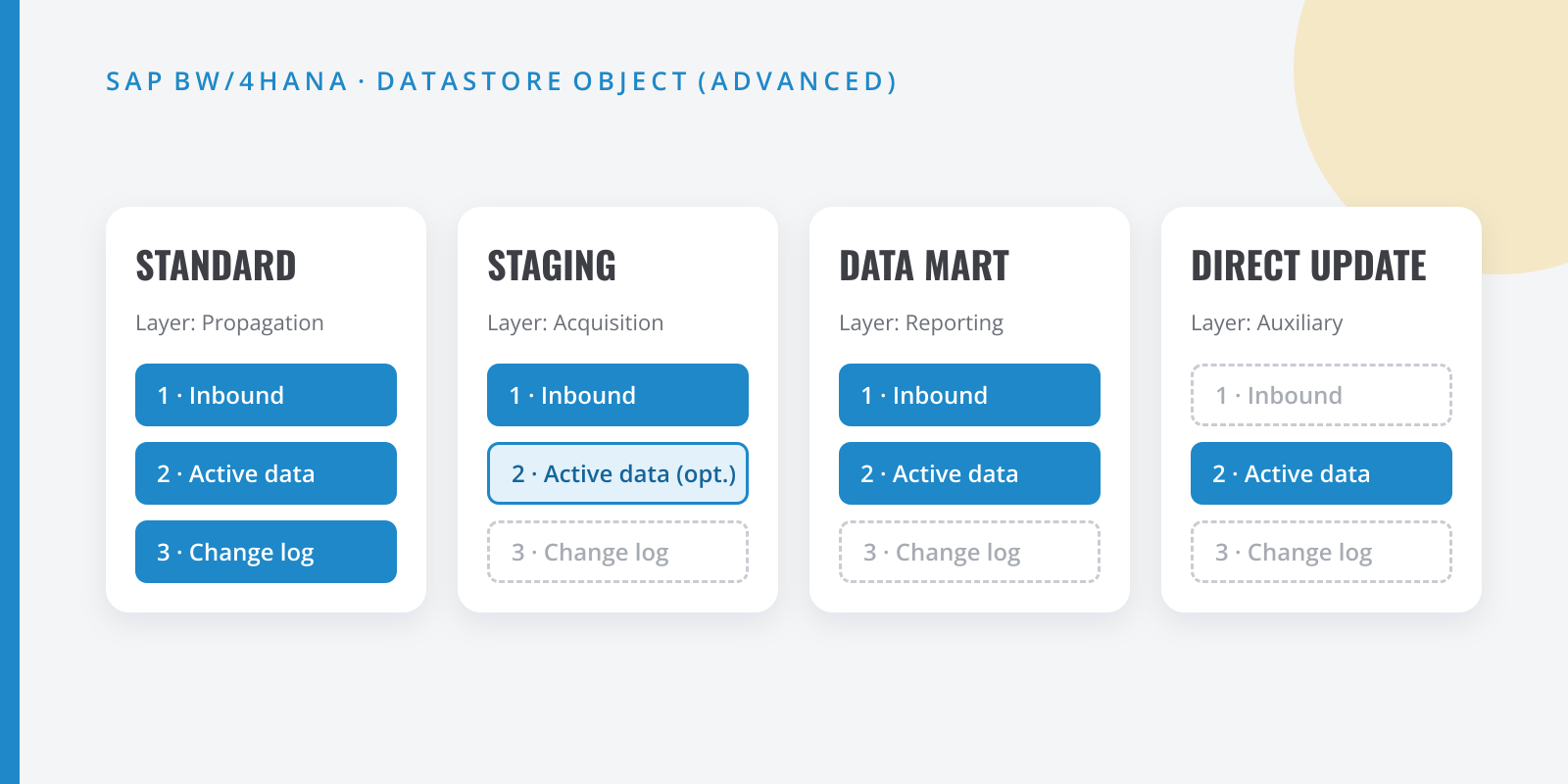
Table of contents
The DataStore Object (advanced), or aDSO, is the centrepiece of any SAP BW/4HANA data model. It replaces the old classic DSOs, InfoCubes, the PSA and direct-update tables. The catch is that the same object behaves very differently depending on the modeling template you pick when you create it.
In this tip we go through the four types, which tables each one creates and which layer of the architecture it belongs to.
The three tables of an aDSO
Before comparing them, it helps to know the skeleton. An aDSO can create up to three tables in the database:
| Suffix | Table | What it is for |
|---|---|---|
1 |
Inbound table | Receives data exactly as it arrives from the DTP, request by request. |
2 |
Active data | Data already activated (or compressed), ready to be read. |
3 |
Change log | Before/after image of every change, used to serve deltas. |
For example, an aDSO called ZSALES01 creates /BIC/AZSALES011, /BIC/AZSALES012 and /BIC/AZSALES013. Which tables exist and how data moves between them is exactly what changes from one type to another.
Standard DataStore Object
This is the equivalent of the classic DSO and the type you will use most in the propagation/harmonization layer.
- It uses all three tables: inbound, active and change log.
- On activation, records are overwritten or summed in the active table according to the key, and the change is recorded in the change log.
- It serves clean deltas to the objects above it.
Staging DataStore Object
Designed for the acquisition layer, where in BW 7.x you would have had the PSA or a write-optimized DSO. It comes in three flavours:
- Inbound Data Only: inbound table only. No activation; it is just a buffer of the source.
- Compress Data: on activation, data moves from the inbound table to the active table and is removed from the former. Ideal for reducing volume once the downstream objects have read the delta.
- Reporting-Enabled: like the previous one, but activated data can be read by a query.
Use it when you need to keep the source data untransformed and be able to reload without going back to the source system.
Data Mart DataStore Object
The successor of the InfoCube and the natural choice for the reporting layer when you work with aggregatable key figures.
- All characteristics are part of the key; key figures are aggregated (usually summed).
- It has an inbound and an active table, but no change log: “activation” is the equivalent of compressing a cube.
- Queries read both the inbound and the active table, so data is visible as soon as it is loaded, even before activation.
Direct Update DataStore Object
The heir of the direct-update DSO. It has only the active table and is not loaded through the usual request flow; instead, programs write to it: APD, planning or APIs (the RSDSO_DU_* function modules).
It is useful for manually maintained business master data, mapping tables or the results of analysis processes. Do not use it as a lazy replacement for an ETL flow: you lose request traceability.
Quick summary
| Type | Tables | Typical layer | Delta upwards |
|---|---|---|---|
| Standard | 1 + 2 + 3 | Propagation | Yes (change log) |
| Staging | 1 (+ 2) | Acquisition | Yes (from inbound) |
| Data Mart | 1 + 2 | Reporting | Yes (from inbound) |
| Direct Update | 2 | Auxiliary data | No (full) |
The rule I apply on projects: Staging to bring data in, Standard to harmonize and keep the single source of truth, Data Mart only when the query benefits from aggregation, and Direct Update for whatever does not come from any system.
Do you use a different combination in your models? Message me on LinkedIn and let’s talk about it.